
A useful webinar clip keeps the explanation and any essential visible evidence together. Start by mapping whether the meaning lives in the speaker’s words, a slide, a demonstration or a combination of them. Reconnect questions and answers that were separated during the event. Only then choose a vertical layout and edit the clip.
That order matters. A clean 9:16 crop can still be wrong if it hides the chart that supports the claim, removes the question that frames the answer or cuts away before a demonstration shows its result.
This guide gives you three webinar-specific working tools:
- a three-channel meaning map for locating where meaning lives;
- a Q&A bridge sheet for reconnecting separated questions and answers; and
- a vertical evidence survival check for protecting slides, screen shares and demonstrations.
The workflow is tool-neutral. It does not assume that every webinar contains a fixed number of clips, and it does not treat an automatically suggested highlight as an approved edit.
The webinar-to-short-video workflow
Use this sequence for each recording:
- Collect the recording, transcript, slide deck, chapter markers, Q&A record and any chat or poll material you are allowed to review.
- Mark where the introduction, housekeeping, promotion and event administration end.
- Build a source map of teaching claims, questions, demonstrations and presenter changes.
- Run the three-channel meaning map on each candidate.
- Reconnect separated Q&A with a bridge only when the bridge can be verified from the source.
- Decide whether the speaker, slide, screen share or a synchronised combination should lead.
- Test whether every essential visual survives the intended vertical layout.
- Correct captions, speaker labels, numbers, names and on-screen identities.
- Check reuse records and remove unsuitable participant or interface material.
- Export for the intended platform and inspect the actual uploaded draft before publishing.
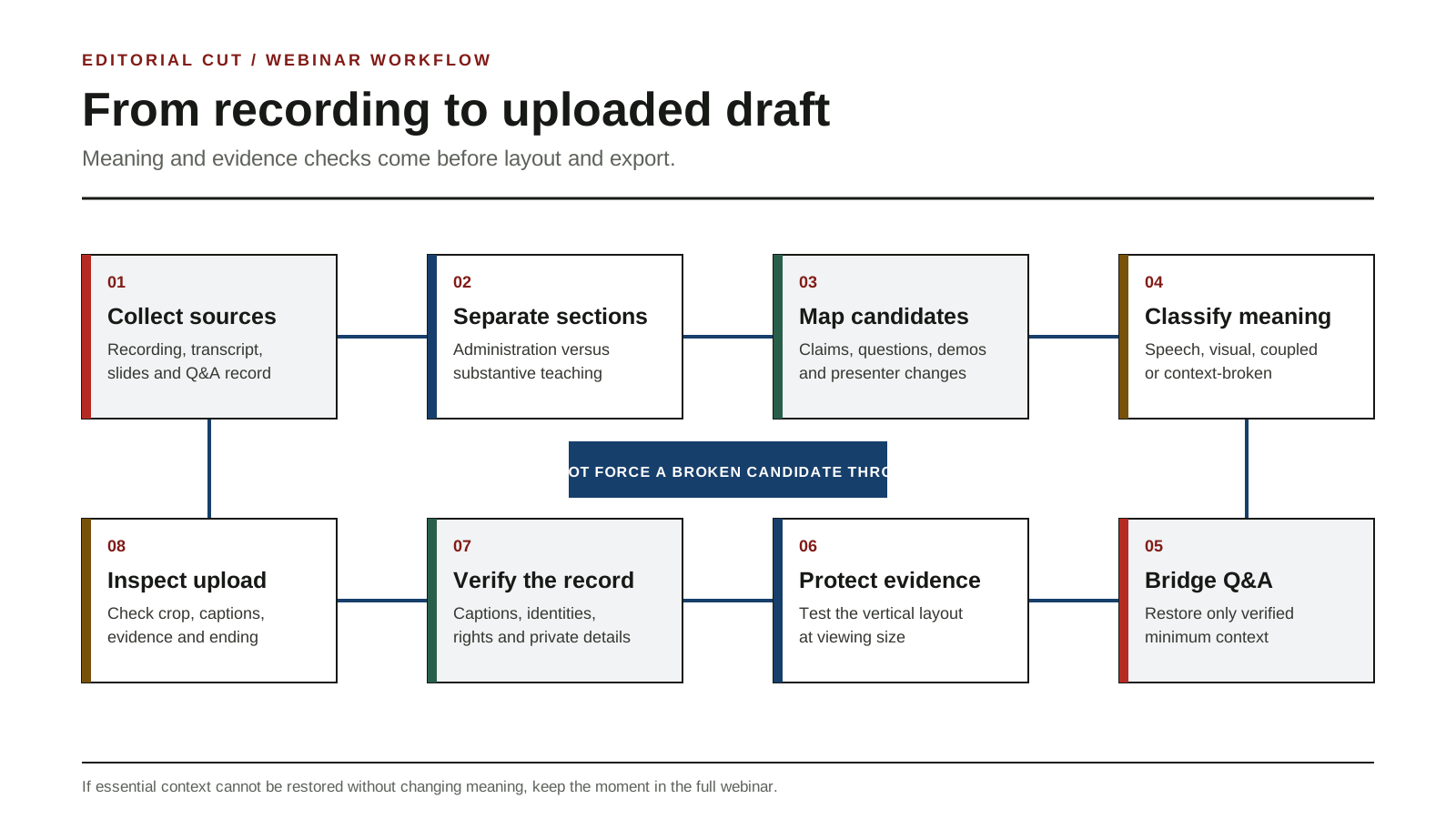
You do not need to force a candidate through every stage. If essential context cannot be restored without changing the meaning, keep that moment in the full webinar.
Start after the introduction, but before context disappears
A webinar opening may contain a title card, speaker biographies, sponsor language, agenda slides, housekeeping and instructions for audience questions. Most of this is not a short teaching moment.
Do not solve that problem by cutting blindly to the first energetic sentence. The first useful sentence may still depend on the title slide, the moderator’s setup or a definition introduced a few seconds earlier.
Find the first real teaching action
Look for the point where the event changes from administration to substance. That may be:
- the presenter defining the problem;
- the host asking the first substantive question;
- a slide introducing a framework;
- a screen share opening the relevant interface;
- the start of a worked example; or
- a participant question that reveals a practical objection.
Then inspect backwards. Keep the shortest source section that lets a new viewer identify what is being discussed and why the next statement matters.
Treat promotional sections as source context, not automatic clips
A product mention, event offer or call to action may be part of the webinar, but that does not make it an independent teaching moment. Keep promotional material only when it is necessary to understand the claim and suitable for the intended publication.
Remove or reject sections that rely on:
- a time-limited offer that is no longer current;
- an unsupported superlative;
- a customer or product claim that has not been checked;
- a registration instruction that makes no sense after the live event; or
- a sponsor reference that would turn the clip into an undeclared advertisement.
This article does not authorise a factual rewrite. If removing promotional language changes the claim, keep the original context or do not use the candidate.
Build a candidate map from the recording, transcript, slides and Q&A
A transcript is useful, but it is not the webinar. It cannot show which chart was visible, whether the presenter clicked the promised control or whether the answer came from a different speaker than the transcript suggests.
Review the source materials together:
| Source | What it can reveal | What it can miss |
|---|---|---|
| Recording | Timing, speaker changes, visible evidence and demonstrations | Searchable wording may be slow to locate |
| Transcript | Claims, questions, names and timestamps | Slide state, cursor movement and visual meaning |
| Slide deck | Intended structure, diagrams and source labels | The exact slide state or what the presenter actually said |
| Q&A record | Questions, questioners and moderation order | Whether an answer relied on an earlier explanation |
| Chat or polls | Audience confusion and useful follow-up prompts | Permission to republish names or messages |
| Chapter markers | Broad topic boundaries | Fine clip boundaries and dependencies |
Candidate-source map
Use one row for every possible teaching moment. This is not a clip quota.
| Candidate | Source range | Teaching action | Speaker | Required slide or screen state | Earlier dependency | Participant material | Next review |
|---|---|---|---|---|---|---|---|
| Example only | 00:24:10 to 00:25:02 | Explains why a setting changes the result | Guest presenter | Result panel after the second click | Question at 00:23:41 | Questioner name visible | Q&A bridge and evidence check |
The example is synthetic. It illustrates the fields and is not a product result.
Candidate types worth reviewing
Webinar-specific candidates often include:
- a definition followed by a clear example;
- a misconception corrected with visible evidence;
- a framework explained on one slide;
- a demonstration with a visible before-and-after state;
- a question that draws out a practical answer;
- a host summary that accurately closes a longer exchange;
- a guest changing or qualifying an earlier statement; or
- a slide that turns a broad claim into a concrete sequence.
Intensity is not enough. Applause, surprise or a sharp line can still depend on context that the short clip cannot carry.
Run the three-channel meaning map
The three-channel meaning map deliberately removes information during review. It helps you discover whether a candidate is safe to edit as speech, must preserve visual evidence or cannot stand alone.
Review 1: transcript only
Read the candidate without watching or listening.
Ask:
- Is the subject named?
- Is the question or problem clear?
- Does the claim include its important condition?
- Do words such as “this”, “that”, “here” or “the second one” point to something missing?
- Does the sentence depend on a definition or example from earlier in the webinar?
A clean transcript can still fail if the proof sits on screen.
Review 2: audio only
Listen without looking at the video.
Ask:
- Can you identify who is speaking?
- Can you distinguish the host, guest and presenter?
- Is the question audible or recoverable?
- Does the speaker refer to a chart, cursor movement or interface state?
- Is a pause carrying a visual action that the audio does not explain?
Audio-only review is especially useful for demonstrations. “Now it works” is not a complete explanation if the viewer cannot see what changed.
Review 3: visual only
Watch without sound and inspect the frames.
Ask:
- Can you identify the relevant slide or interface?
- Is the essential text legible?
- Does the cursor or highlight show the action?
- Does the result appear long enough to inspect?
- Is the visible speaker the person making the claim?
- Are attendee names, messages, email addresses or private tabs visible?
Classify the candidate
| Classification | Meaning carrier | Editing implication |
|---|---|---|
| Speech-led | Spoken explanation contains the necessary meaning | Speaker-forward layout may work if labels and captions are accurate |
| Visual-led | Slide, chart or demonstration carries the essential evidence | Evidence-forward layout is required |
| Coupled | Speech and visual evidence must stay synchronised | Preserve timing and inspect both channels after every edit |
| Context-broken | Earlier question, slide, speaker or state is essential and missing | Rebuild with verified context or keep in the full webinar |
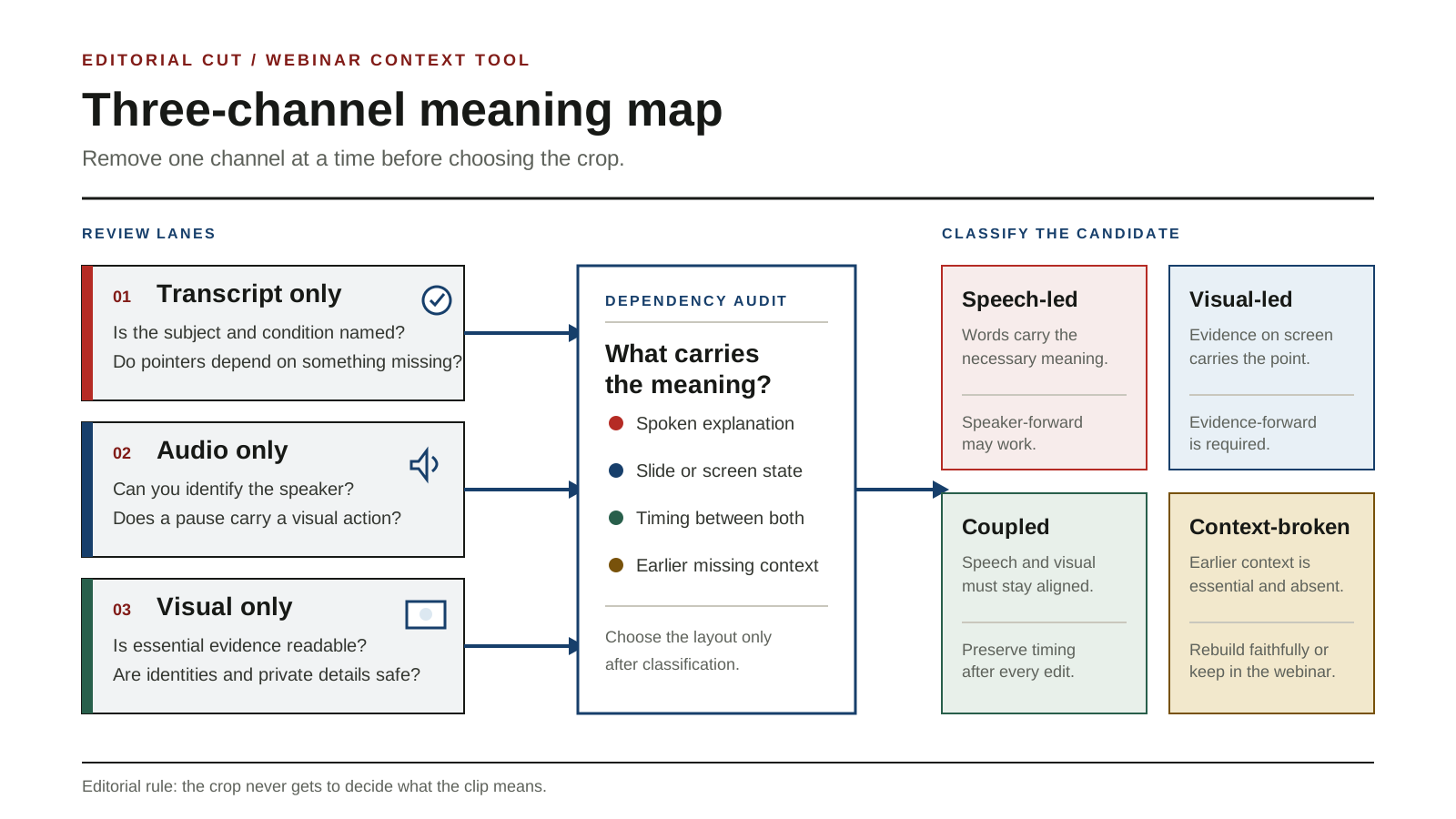
Do not choose the layout before this classification. Doing so makes the crop, rather than the meaning, control the edit.
Reconnect questions and answers with a Q&A bridge
Webinar Q&A does not always arrive as a neat question immediately followed by a neat answer. The host may summarise the question, another guest may interrupt, the presenter may return to an earlier slide and the useful answer may begin several minutes later.
A Q&A bridge records the missing connection before anyone writes an opening.
Copyable Q&A bridge sheet
| Field | Entry |
|---|---|
| Candidate ID | |
| Question timestamp | |
| Answer timestamp | |
| Questioner role | |
| Answering speaker | |
| Minimum question wording needed | |
| Earlier slide or demonstration dependency | |
| Pronoun or pointer dependency | |
| Sensitive participant detail | |
| Proposed bridge | |
| Bridge format | Retained audio, on-screen text or editor-written introduction |
| Verification owner | |
| Outcome | Ready intact, rebuild with bridge or keep in full webinar |
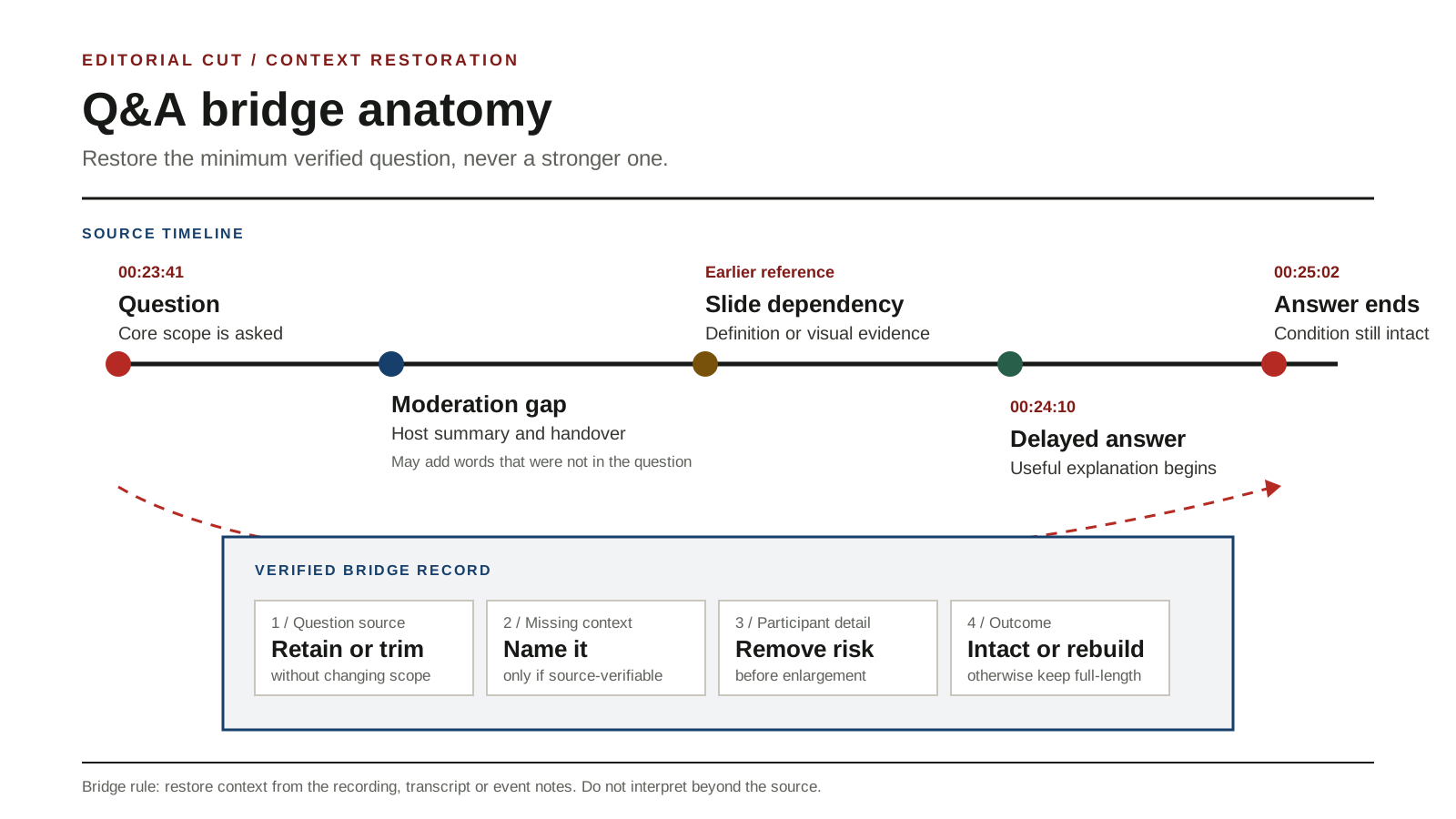
Keep the original question when it works
The strongest bridge is often the source itself. Retain the host’s or participant’s question when it is concise, audible, suitable for publication and close enough to the answer.
Shorten a question without changing its scope
A long question may contain biography, praise or several examples. You may trim material around the core question, but do not broaden or narrow what the speaker answered.
Check the edited question and answer together. A yes-or-no answer can become misleading when its condition has been removed.
Use editor-written bridge text carefully
Bridge text can identify the verified subject, for example:
The audience asked how the process changes when the source includes a live demonstration.
Do not write a stronger question than the source asked. Do not add a conclusion, motive or promise that the speaker did not express. If the bridge cannot be checked against the transcript, recording or event notes, do not use it.
Keep some answers in the full webinar
Return the candidate to the full webinar when:
- the question cannot be recovered;
- the answer depends on several earlier slides;
- the speaker is correcting another person whose claim is absent;
- the response concerns a participant’s private circumstances;
- the answer changes later in the session; or
- a bridge would require interpretation rather than restoration.
Decide whether the speaker, slide or demonstration should lead
Webinar reframing is not a choice between a face and a screen. It is a choice about what the viewer must inspect.
Speaker-led moments
Use a speaker-forward layout when the spoken explanation carries the meaning and the original visual is optional.
Check:
- the active speaker is correctly identified;
- host and guest cuts do not imply the wrong person is speaking;
- captions do not cover the face or name label;
- gestures pointing off-screen do not create a missing reference; and
- a slide title is not needed to define the topic.
Slide-led moments
Use an evidence-forward layout when a chart, diagram, equation, quotation or list carries the teaching point.
The speaker does not need to remain large throughout. A small speaker window may be enough, or the slide may temporarily fill the frame. The decision should follow the evidence, not a desire to keep a face visible at every moment.
Coupled moments
Use a split or staged layout when the viewer must see the explanation and evidence together.
Examples include:
- a presenter comparing two areas of a chart;
- a guest explaining a diagram while the host asks clarifying questions;
- a slide building one step at a time; or
- a screen share where the spoken condition and visible setting must match.
Keep the channels synchronised. Removing a pause may move the spoken explanation ahead of the visual state it describes.
Demonstration-led moments
A demonstration is a sequence, not a screenshot.
Preserve:
- the starting state;
- the action;
- the visible change; and
- the explanation of what the change means.
If the viewer sees only the final state, the clip may claim a result without showing how it happened. If the viewer sees only the action, the promised payoff may never appear.
Check whether visual evidence survives a vertical frame
A 9:16 export is not successful merely because every pixel fits somewhere. The viewer must still be able to inspect the evidence on a phone-sized frame.
Vertical evidence survival table
| Required visual | What it proves | Must remain simultaneous with speaker? | Readable in proposed frame? | Motion or state dependency | Private detail risk | Edit decision |
|---|---|---|---|---|---|---|
| Example only: result panel | Confirms the demonstrated setting changed | No | Needs enlargement | Final state must remain for inspection | Account name in corner | Enlarge panel and remove unrelated account detail |
The example is synthetic and does not describe a tested product.
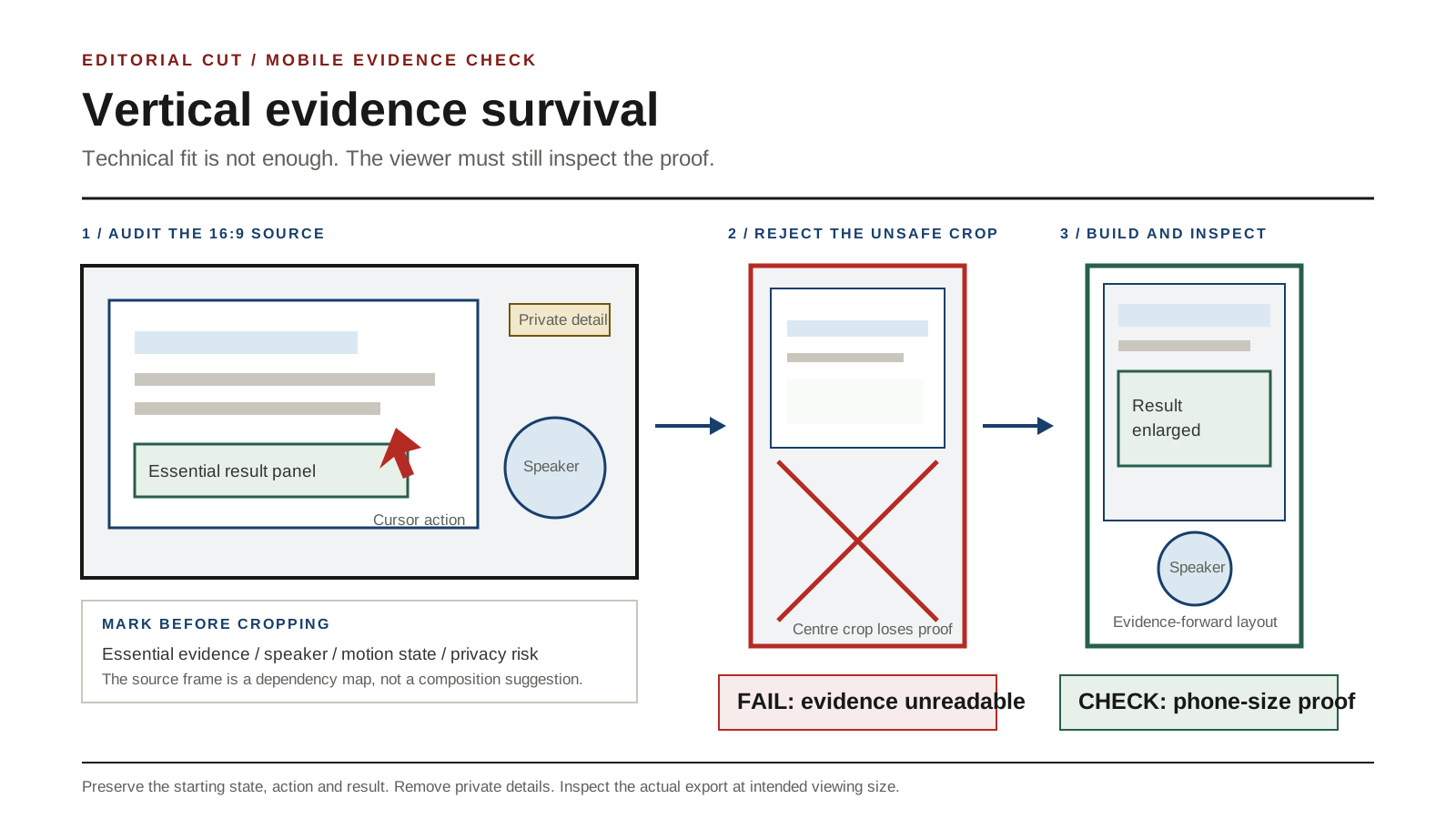
Inspect evidence at intended viewing size
Do not approve a layout only on a desktop editing monitor. View the actual export at the approximate size and orientation in which it will be watched.
Check:
- labels, legends and numbers;
- slide footnotes that qualify the claim;
- cursor visibility;
- selected menu item or control state;
- before-and-after differences;
- speaker labels;
- captions; and
- any source attribution that must remain visible.
Use staged reframing when one crop cannot do the job
A webinar clip may need to change layout as the teaching action changes:
- speaker-forward for the setup;
- evidence-forward for the slide or demonstration;
- a controlled zoom for the important result; and
- speaker-forward again for the conclusion.
Each change should follow meaning. Avoid decorative movement that makes evidence harder to inspect.
Recreate only what you can verify
A neutral redrawn diagram or enlarged callout can improve legibility, but it creates an editorial responsibility. Copy labels and values exactly, preserve qualifications and identify the original source where needed.
Do not invent missing interface states, charts, cursor movements or results. If the original evidence cannot be read and cannot be recreated faithfully, reject the candidate.
Handle presenter changes, captions and on-screen identities
Host, guest and presenter transitions
A webinar may use one person to ask, another to answer and a third to demonstrate. A short clip can misattribute a statement when it starts after the name label disappears or cuts between similar voices.
For every speaker change:
- confirm the voice against the video;
- retain or add a verified name and role when needed;
- remove stale labels from the previous speaker;
- check that reaction shots do not imply authorship; and
- keep a host summary only when it accurately represents the guest’s answer.
Caption correction
Specialist webinars produce caption risks such as:
- presenter and company names;
- acronyms;
- model, feature or framework names;
- numbers and units;
- web addresses;
- quoted questions;
- words spoken while a demonstration changes state; and
- near-homophones that remain grammatically plausible.
TikTok documents both auto-generated captions and creator captions, and says creator captions can be previewed and edited line by line.[7] That editing capability does not remove the need to compare the final captions with the recording.
Correct meaning, not only spelling. A missing “not”, an incorrect decimal or a swapped product name can reverse the teaching point.
On-screen identities and participant material
Inspect the entire frame, not only the central crop. Remove or obscure material that is not suitable for publication, including:
- attendee names;
- email addresses;
- private chat;
- notifications;
- account names;
- internal tabs or documents;
- customer records;
- unreleased product information; and
- unrelated third-party material.
Do not assume that a detail becomes harmless because it is small in the original 16:9 recording. Reframing or zooming may make it prominent.
Check permissions before you create a public clip
Keep a source record for the webinar. At minimum, check:
- who owns or controls the recording;
- what the event registration and recording notice said;
- speaker or presenter agreements;
- permitted channels and territories;
- whether slides contain third-party material;
- whether attendee questions, chat or names may be republished;
- whether customer, employee or confidential information appears; and
- whether the intended clip changes the context in which permission was given.
Some webinar platforms create a record of recording consent. Zoom, for example, states that participants are asked to provide consent when joining a meeting already being recorded or when the host begins recording.[8]
Treat that as one source record, not as proof that every contribution, slide, chat message or later public use is cleared. UK law also contains performer protections concerning the recording of qualifying live performances, but the application depends on the facts.[9]
This guide is an editorial workflow, not legal advice. If rights or data-protection questions remain unclear, stop the candidate and obtain appropriate advice.
Export for the intended platform
Platform specifications are a delivery check, not a quality verdict. A file can meet the technical rules while hiding the evidence that makes the clip useful.
YouTube Shorts
YouTube documents a built-in route for turning a creator’s own public uploaded long-form video into a Short. The help page says private, unlisted and third-party-copyright-claimed videos cannot use that feature.[5]
A webinar editor may also create a vertical file outside that route. In either case, inspect the uploaded draft for crop, captions, title, attribution and context before publishing.
Instagram Reels
Instagram currently states that a Reel can use an aspect ratio between 1.91:1 and 9:16, with a minimum frame rate of 30 FPS and minimum resolution of 720 pixels.[6]
Those are platform specifications. They do not establish that a webinar slide or demonstration remains legible. Use the vertical evidence survival check on the final uploaded draft.
TikTok
TikTok documents auto-generated captions for uploaded videos and creator-caption editing.[7] Check the platform’s current controls at the time of publication, then verify specialist terms, speaker names, numbers and line breaks.
Final uploaded-draft check
For every destination:
- watch from the first frame to the last;
- confirm the opening identifies the subject;
- confirm the correct speaker is visible or labelled;
- inspect slide text and demonstration states;
- read every caption line;
- check that interface and participant details are suitable;
- confirm source attribution where required;
- confirm the ending contains the result or conclusion; and
- check the current official platform guidance before publication.
Do not force one export to serve every platform when its crop, caption placement or interface controls hide different parts of the evidence.
Common webinar-clipping failures
Starting with the answer and losing the question
The answer may sound decisive while becoming broader than the question the speaker actually addressed. Restore the verified question or keep the moment in the full webinar.
Showing a face while hiding the proof
A speaker-forward crop can remove the chart, setting or result that supports the statement. Classify the candidate before choosing the layout.
Treating a demonstration as a static screen share
A demonstration needs its starting state, action and result. A screenshot-like crop may preserve appearance while losing causality.
Cutting host and guest transitions too tightly
Removing every pause can hide who is speaking, shift an answer onto the wrong question or make a host summary appear to be the guest’s own words.
Trusting the transcript over the recording
A transcript can locate language, but it cannot show a changed slide, an unreadable label, a failed click or private information on screen.
Replacing context with a stronger hook
An editor-written opening should restore verified context, not exaggerate the claim. Do not convert a qualified answer into a universal promise.
Assuming recording consent equals republication clearance
A recording prompt is only one record. Check the event terms, speaker arrangements, visual material and intended public use separately.
Publishing a clip quota
Some webinars contain many useful moments. Others contain none that survive outside the full presentation. The source decides the output, not a target number.
Keeping old promotional details
A live-event offer, registration instruction or dated claim can become inaccurate after the event. Remove it only when the teaching point remains intact, otherwise reject the candidate.
Webinar-to-short-video checklist
Before selection
- Collect the recording, transcript, slides, chapter markers and Q&A record
- Confirm which source materials you are allowed to review and reuse
- Mark the end of housekeeping and the start of substantive teaching
- Identify speaker, slide, screen-share and demonstration changes
- Record any participant or confidential-material risks
For each candidate
- State the teaching action in one sentence
- Review the transcript without the visual
- Review the audio without the visual
- Review the visual without the audio
- Classify the candidate as speech-led, visual-led, coupled or context-broken
- Restore the verified question where required
- Identify every essential slide, chart or interface state
- Preserve the start, action and result of a demonstration
- Verify speaker identity and role
- Check captions, names, numbers and jargon
- Remove unsuitable participant or interface material
- Choose ready intact, rebuild with bridge or keep in full webinar
Before publication
- Check the recording notice, agreements and intended reuse
- Inspect the export at intended viewing size
- Watch the uploaded draft on the destination platform
- Confirm the opening, evidence and ending remain connected
- Verify all source attribution
- Recheck current official platform guidance
- Confirm there is no unsupported product claim or recommendation
- Confirm there is no affiliate or tracking link
Evidence and limitations
This is a tool-neutral editorial workflow. ChooseMyAI has not used this article to test or rank webinar-clipping products. It does not claim a typical clip yield, editing time, saving, accuracy rate or return on investment.
The number of usable clips and the work required depend on the recording, speakers, slides, demonstrations, permissions and publication destination. Platform features and specifications can change, so current official guidance should be checked again before publication.
For a dialogue-led webinar with few visual dependencies, use the podcast-to-Shorts workflow for the shared complete-thought principle rather than duplicating it here.
Read how ChooseMyAI separates evidence from claims before evaluating software. If you later need to understand the available categories without treating them as recommendations, see the neutral AI video repurposing landscape.
Next step
Copy the candidate-source map, Q&A bridge sheet and vertical evidence survival table for your recording. Complete those checks before choosing software or applying a vertical crop.
Sources
Platform features, specifications and support pages can change. YouTube, Instagram, TikTok and Zoom were rechecked immediately before staging QA on 18 September 2026. The UK legislation and Google guidance were retained from the reviewed source record checked on 17 September 2026.
- [5] YouTube Help: Create YouTube Shorts from your videosOfficial source. Rechecked 18 September 2026.
- [6] Instagram Help Centre: Reel size and aspect ratiosOfficial source. Rechecked 18 September 2026.
- [7] TikTok Support: Accessibility for creating videosOfficial source. Rechecked 18 September 2026.
- [8] Zoom Support: Providing consent to be recordedOfficial source. Rechecked 18 September 2026.
- [9] UK legislation: Copyright, Designs and Patents Act 1988, section 182Official source. Rechecked 17 September 2026.
- [10] Google Search Central: Article structured dataOfficial source. Rechecked 17 September 2026.